【超全总结】机器学习必备的9大python库简介:Numpy、Scipy、Scikit-learn、Theano、TensorFlow、Keras、PyTorch、Pandas、Matplotlib
【超全总结】机器学习必备的9大python库简介:Numpy、Scipy、Scikit-learn、Theano、TensorFlow、Keras、PyTorch、Pandas、Matplotlib
《博主简介》
小伙伴们好,我是阿旭。专注于人工智能、AIGC、python、计算机视觉相关分享研究。
👍感谢小伙伴们点赞、关注!
《------往期经典推荐------》
二、机器学习实战专栏【链接】,已更新31期,欢迎关注,持续更新中~~
三、深度学习【Pytorch】专栏【链接】
四、【Stable Diffusion绘画系列】专栏【链接】
五、YOLOv8改进专栏【链接】,持续更新中~~
六、YOLO性能对比专栏【链接】,持续更新中~
《------正文------》
引言
顾名思义,机器学习是一门对计算机进行编程的科学,通过编程计算机可以从不同类型的数据中学习。更一般的定义是:“机器学习是一门让计算机无需明确编程就能学习的学科。”它们通常用于解决各种类型的生活问题。
在过去,人们习惯于通过手动编写所有算法、数学和统计公式来执行机器学习任务。这使得处理过程耗时、繁琐且效率低下。但在现代,有了各种 Python 库、框架和模块,与过去相比,这变得非常容易和高效。如今,Python 是这项任务最流行的编程语言之一,它已经取代了业内许多语言,原因之一是它拥有大量的库。
机器学习中使用的 Python 库包括:
- Numpy
- Scipy
- Scikit-learn
- Theano
- TensorFlow
- Keras
- PyTorch
- Pandas
- Matplotlib
Numpy

NumPy 是一个非常流行的 Python 库,用于处理大型多维数组和矩阵,并借助大量高级数学函数。它对于机器学习中的基础科学计算非常有用。它对于线性代数、傅里叶变换和随机数功能特别有用。像 TensorFlow 这样的高端库在内部使用 NumPy 来操作张量。
# Python program using NumPy
# for some basic mathematical
# operations

import numpy as np

# Creating two arrays of rank 2
x = np.array([[1, 2], [3, 4]])
y = np.array([[5, 6], [7, 8]])

# Creating two arrays of rank 1
v = np.array([9, 10])
w = np.array([11, 12])

# Inner product of vectors
print(np.dot(v, w), "\n")

# Matrix and Vector product
print(np.dot(x, v), "\n")

# Matrix and matrix product
print(np.dot(x, y))
*输出:*
219

[29 67]

[[19 22]
[43 50]]
Scipy

SciPy 是机器学习爱好者中非常流行的库,因为它包含用于优化、线性代数、积分和统计的不同模块。SciPy 库和 SciPy 堆栈之间存在差异。SciPy 是组成 SciPy 堆栈的核心包之一。SciPy 对于图像处理也非常有用。
# Python script using Scipy
# for image manipulation

from scipy.misc import imread, imsave, imresize

# Read a JPEG image into a numpy array
img = imread('D:/Programs / cat.jpg') # path of the image
print(img.dtype, img.shape)

# Tinting the image
img_tint = img * [1, 0.45, 0.3]

# Saving the tinted image
imsave('D:/Programs / cat_tinted.jpg', img_tint)

# Resizing the tinted image to be 300 x 300 pixels
img_tint_resize = imresize(img_tint, (300, 300))

# Saving the resized tinted image
imsave('D:/Programs / cat_tinted_resized.jpg', img_tint_resize)
如果 scipy.misc import imread, imsave,imresize 在你的操作系统上不起作用,请尝试使用下面的代码来继续执行上面的代码
!pip install imageio
import imageio
from imageio import imread, imsave
*原始图像:*

*有色图像:*

*调整大小后的彩色图像:*

Scikit-learn

Scikit-learn 是经典 ML 算法最流行的 ML 库之一。它建立在两个基本 Python 库(即 NumPy 和 SciPy)之上。Scikit-learn 支持大多数监督和无监督学习算法。Scikit-learn 还可用于数据挖掘和数据分析,这使其成为 ML 入门者的绝佳工具。
# Python script using Scikit-learn
# for Decision Tree Classifier

# Sample Decision Tree Classifier
from sklearn import datasets
from sklearn import metrics
from sklearn.tree import DecisionTreeClassifier

# load the iris datasets
dataset = datasets.load_iris()

# fit a CART model to the data
model = DecisionTreeClassifier()
model.fit(dataset.data, dataset.target)
print(model)

# make predictions
expected = dataset.target
predicted = model.predict(dataset.data)

# summarize the fit of the model
print(metrics.classification_report(expected, predicted))
print(metrics.confusion_matrix(expected, predicted))
*输出:*
DecisionTreeClassifier(class_weight=None, criterion='gini', max_depth=None,
            max_features=None, max_leaf_nodes=None,
            min_impurity_decrease=0.0, min_impurity_split=None,
            min_samples_leaf=1, min_samples_split=2,
            min_weight_fraction_leaf=0.0, presort=False, random_state=None,
            splitter='best')
              precision    recall  f1-score   support

           0       1.00      1.00      1.00        50
           1       1.00      1.00      1.00        50
           2       1.00      1.00      1.00        50

   micro avg       1.00      1.00      1.00       150
   macro avg       1.00      1.00      1.00       150
weighted avg       1.00      1.00      1.00       150

[[50  0  0]
 [ 0 50  0]
 [ 0  0 50]]
Theano

我们都知道,机器学习基本上是数学和统计学。Theano 是一个流行的 Python 库,用于以有效的方式定义、评估和优化涉及多维数组的数学表达式。它是通过优化 CPU 和 GPU 的利用率来实现的。它广泛用于单元测试和自我验证,以检测和诊断不同类型的错误。Theano 是一个非常强大的库,长期以来一直用于大规模计算密集型科学项目,但它足够简单易用,可供个人用于自己的项目。
# Python program using Theano
# for computing a Logistic
# Function

import theano
import theano.tensor as T
x = T.dmatrix('x')
s = 1 / (1 + T.exp(-x))
logistic = theano.function([x], s)
logistic([[0, 1], [-1, -2]])
*输出:*
array([[0.5, 0.73105858],
       [0.26894142, 0.11920292]])
TensorFlow
TensorFlow 是一个非常流行的高性能数值计算开源库,由谷歌的 Google Brain 团队开发。顾名思义,Tensorflow 是一个涉及定义和运行涉及张量的计算的框架。它可以训练和运行深度神经网络,可用于开发多种 AI 应用程序。TensorFlow 广泛应用于深度学习研究和应用领域。
#  Python program using TensorFlow
#  for multiplying two arrays

# import `tensorflow`
import tensorflow as tf

# Initialize two constants
x1 = tf.constant([1, 2, 3, 4])
x2 = tf.constant([5, 6, 7, 8])

# Multiply
result = tf.multiply(x1, x2)

# Initialize the Session
sess = tf.Session()

# Print the result
print(sess.run(result))

# Close the session
sess.close()
*输出:*
[5 12 21 32]
Keras

Keras 是一个非常流行的 Python 机器学习库。它是一种高级神经网络 API,能够在 TensorFlow、CNTK 或 Theano 上运行。它可以在 CPU 和 GPU 上无缝运行。Keras 让机器学习初学者能够真正构建和设计神经网络。Keras 最大的优点之一是它可以轻松快速地进行原型设计。
PyTorch

PyTorch 是一个基于 Torch 的流行 Python 开源机器学习库,Torch 是一个用 C 实现的开源机器学习库,带有 Lua 包装器。它拥有广泛的工具和库选择,支持计算机视觉、自然语言处理 (NLP) 和更多 ML 程序。它允许开发人员使用 GPU 加速对张量执行计算,还有助于创建计算图。
示例
# Python program using PyTorch
# for defining tensors fit a
# two-layer network to random
# data and calculating the loss

import torch


dtype = torch.float
device = torch.device("cpu")
# device = torch.device("cuda:0") Uncomment this to run on GPU

# N is batch size; D_in is input dimension;
# H is hidden dimension; D_out is output dimension.
N, D_in, H, D_out = 64, 1000, 100, 10

# Create random input and output data
x = torch.random(N, D_in, device=device, dtype=dtype)
y = torch.random(N, D_out, device=device, dtype=dtype)

# Randomly initialize weights
w1 = torch.random(D_in, H, device=device, dtype=dtype)
w2 = torch.random(H, D_out, device=device, dtype=dtype)

learning_rate = 1e-6
for t in range(500):
    # Forward pass: compute predicted y
    h = x.mm(w1)
    h_relu = h.clamp(min=0)
    y_pred = h_relu.mm(w2)

    # Compute and print loss
    loss = (y_pred - y).pow(2).sum().item()
    print(t, loss)

    # Backprop to compute gradients of w1 and w2 with respect to loss
    grad_y_pred = 2.0 * (y_pred - y)
    grad_w2 = h_relu.t().mm(grad_y_pred)
    grad_h_relu = grad_y_pred.mm(w2.t())
    grad_h = grad_h_relu.clone()
    grad_h[h < 0] = 0
    grad_w1 = x.t().mm(grad_h)

    # Update weights using gradient descent
    w1 -= learning_rate * grad_w1
    w2 -= learning_rate * grad_w2
输出:
0 47168344.0
1 46385584.0
2 43153576.0
...
...
...
497 3.987660602433607e-05
498 3.945609932998195e-05
499 3.897604619851336e-05
Pandas

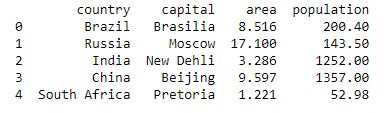
Pandas 是一个流行的 Python 数据分析库。它与机器学习没有直接关系。众所周知,在训练之前必须准备好数据集。在这种情况下,Pandas 非常方便,因为它是专门为数据提取和准备而开发的。它提供了高级数据结构和多种数据分析工具。它提供了许多内置方法来对数据进行分组、组合和过滤。
# Python program using Pandas for
# arranging a given set of data
# into a  table

# importing pandas as pd
import pandas as pd

data = {"country": ["Brazil", "Russia", "India", "China", "South Africa"],
       "capital": ["Brasilia", "Moscow", "New Delhi", "Beijing", "Pretoria"],
       "area": [8.516, 17.10, 3.286, 9.597, 1.221],
       "population": [200.4, 143.5, 1252, 1357, 52.98] }

data_table = pd.DataFrame(data)
print(data_table)
*输出:*
Matplotlib
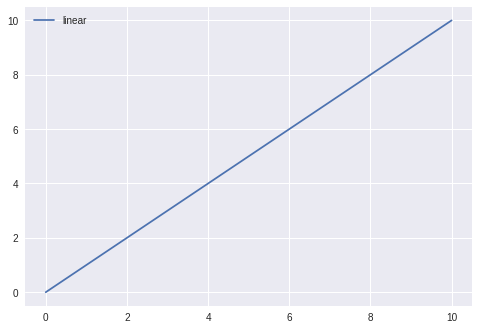
Matplotlib 是一个非常流行的 Python 数据可视化库。与 Pandas 一样,它与机器学习没有直接关系。当程序员想要可视化数据中的模式时,它特别有用。它是一个用于创建 2D 图形和图表的 2D 绘图库。一个名为 pyplot 的模块使程序员可以轻松绘图,因为它提供了控制线条样式、字体属性、格式化轴等功能。它为数据可视化提供了各种图形和图表,即直方图、误差图、条形图等,
#  Python program using Matplotlib
# for forming a linear plot

# importing the necessary packages and modules
import matplotlib.pyplot as plt
import numpy as np

# Prepare the data
x = np.linspace(0, 10, 100)

# Plot the data
plt.plot(x, x, label ='linear')

# Add a legend
plt.legend()

# Show the plot
plt.show()
*输出:*
好了,这篇文章就介绍到这里,喜欢的小伙伴感谢给点个赞和关注,更多精彩内容持续更新~~
关于本篇文章大家有任何建议或意见,欢迎在评论区留言交流!
更多推荐


 27
27 0
0- 0


 已为社区贡献2条内容

所有评论(0)