
pandas访问postgresql数据库简明指南
使用read_sql_table、read_sql_query先看数据表字段:class FailureType(models.Model):name = models.CharField(max_length=100)# 记录class SimpleRollInRecord(models.Model):order_no = models.CharField(max_length=20,defau
·
使用read_sql_table、read_sql_query
先看数据表字段:
class FailureType(models.Model):
    name = models.CharField(max_length=100)
# 记录
class SimpleRollInRecord(models.Model):
    order_no = models.CharField(max_length=20,
                                default=datetime.strftime(datetime.now(), '%Y%m%d%H%M%S'))
    failure_type = models.ForeignKey(FailureType, on_delete=models.CASCADE, null=True)  # 4
failure_type 是外键,sql语句中使用join连接
pandas文档:
pandas.read_sql_table(table_name, con, schema=None, index_col=None, coerce_float=True, parse_dates=None, columns=None, chunksize=None)
con:SQLAlchemy connectable or str
A database URI could be provided as as str. SQLite DBAPI connection mode not supported.
这个界面不支持sqlite
举例:
pd.read_sql_table('table_name', 'postgres:///db_name')
连接很简单,修改con参数即可。但是完整的路径怎么写呢?
import pandas as pd
con = 'postgresql://postgres:1@10.101.0.176/rpt_repair'
postgresql默认5432端口,可以忽略不写,其他端口,则需要指明:
con = 'postgresql://postgres:1@10.101.0.176:5432/rpt_repair'
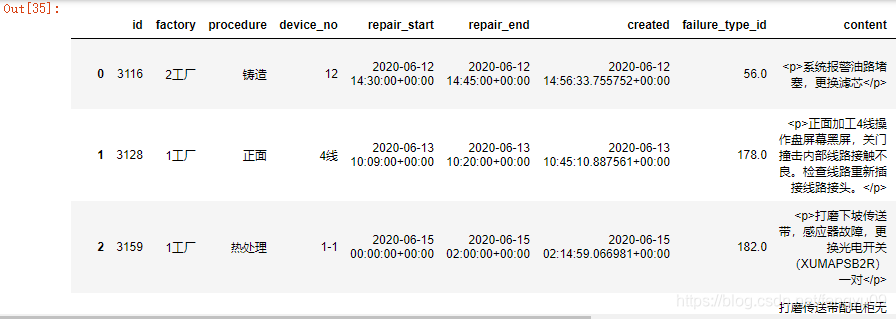
执行结果:
pd.read_sql_table('simple_enroll_simplerollinrecord',con)
使用sql语句查询,注意postgresql日期内容需要使用单引号 :
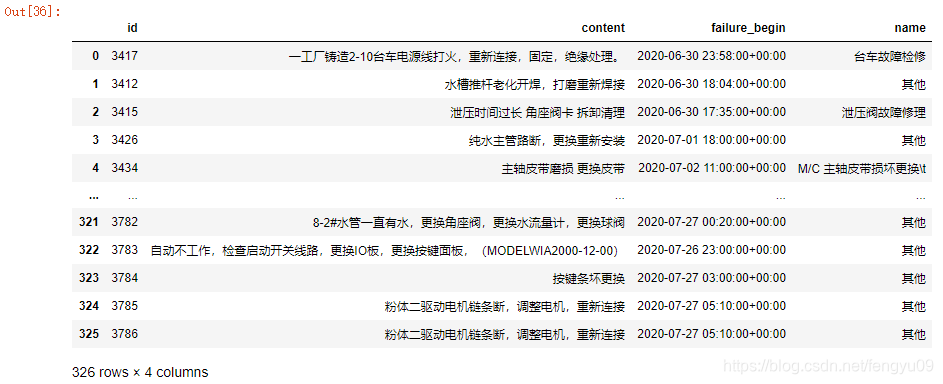
sql = 'select a.id, a.content, a.failure_begin,b.name from simple_enroll_simplerollinrecord as a left join simple_enroll_failuretype as b on a.failure_type_id=b.id'
sql += ' where failure_begin >= \'2020-07-01\' and failure_begin < \'2020-07-31\''
pd.read_sql_query(sql, con)
更多推荐


 0
0 0
0- 0


 已为社区贡献1条内容

所有评论(0)